




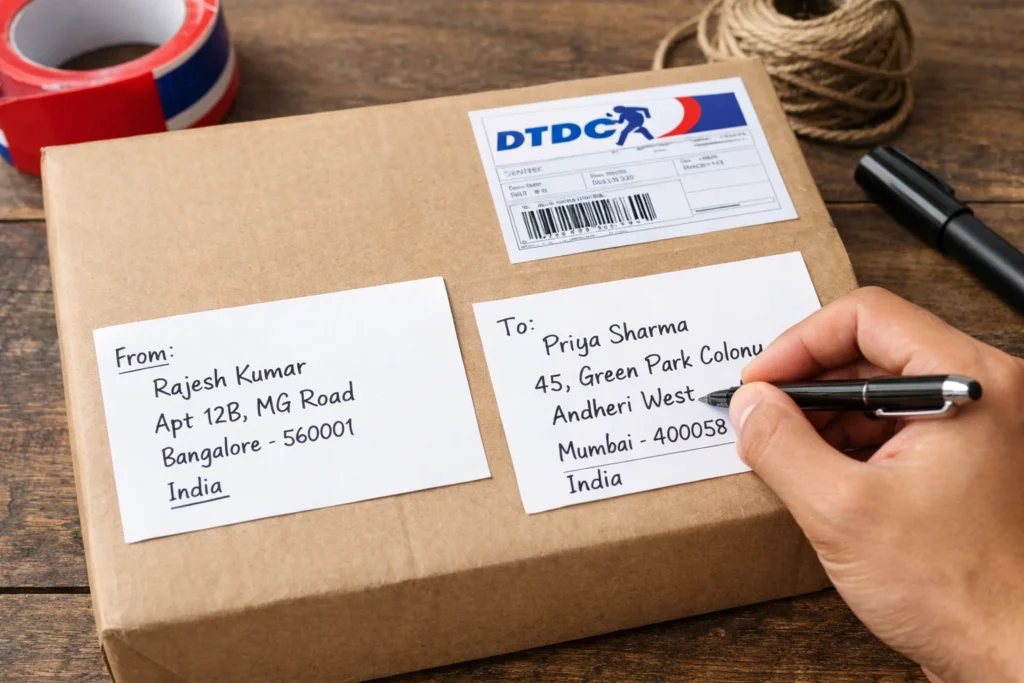
Sending a parcel through DTDC (Desk to Desk Courier & Cargo) is one of the most reliable ways to transport goods across India and internationally. However, the success of your shipment begins long before it reaches the sorting facility. It starts with how you label the package. A single missing digit in a Pincode or a smudged phone number can lead to “Return to Origin” (RTO) status or unnecessary delays.
In this comprehensive guide, we will break down exactly how to format your labels, manage courier pick up, and ensure your parcel reaches its destination safely.
The Golden Rule: From and To in Courier Labels
When preparing your shipment, visual clarity is paramount. Logistics hubs use high-speed scanners to route packages; if your handwriting is cramped or the layout is non-standard, your parcel might be flagged for manual sorting.
1. The Recipient’s Details (The “To” Section)
The “To” section is the most critical part of the label. It should be placed prominently in the center of the package.
- Full Name: Use the legal name of the person or the registered name of the business.
- Complete Address: Include house/flat numbers, wing names, and building names.
- Landmark: Mentioning a nearby school, hospital, or mall helps the delivery executive find the location faster.
- Pincode: This is the 6-digit heart of the address. Never skip it.
- Mobile Number: Essential for the delivery rider to coordinate the final drop-off.
2. The Sender’s Details (The “From” Section)
Always include your details on the top-left corner or the back of the envelope/box. If the recipient is unavailable or the address is incorrect, this information ensures the parcel is returned to you.
- Include your full name and a reliable contact number.
Step-by-Step: Writing the Address Manually
If you are not using a printed thermal label, follow these steps for manual addressing:
- Surface Preparation: If you are reusing a box, ensure all old barcodes or addresses are completely removed or blacked out.
- Use the Right Tools: Use a dark, waterproof permanent marker. Ballpoint pens can tear the packaging or smudge if they get wet.
- Layout Strategy:
- Top Left: “FROM: [Your Name & Phone]”
- Center: “TO: [Recipient Name, Address, Pincode, Phone]”
- The Tape Trick: After writing, place a strip of clear packing tape over the address. This prevents the ink from running if the parcel is exposed to rain during transit.
Managing Your Shipment: Courier Pick Up and Apps
In today’s digital age, you don’t always need to visit a DTDC center. You can easily schedule a courier pickup from home using the official DTDC MyApp or website. This is particularly useful for heavy parcels or for those managing a small business from home.
Just as you might track your car insurance policy and premiums using an app to stay organized, using the DTDC app allows you to maintain a digital history of all your “From” and “To” addresses, making future shipments even faster.
Organizing High-Volume Shipments
For power users or e-commerce sellers, keeping track of hundreds of addresses and delivery times can be a challenge. If you find yourself overwhelmed by logistics data, learning how to master Power BI Desktop in just 10 steps can help you create a dashboard to visualize your shipping efficiency and costs over time.
Pro-Tips for DTDC International Shipping
If you are sending a parcel outside of India, the “how to write address on courier” rules become even stricter:
- Country Code: Always include the country code with the mobile number (e.g., +1 for USA, +44 for UK).
- Customs Declaration: On the side of the box, you must often attach a “Packing List” or Invoice.
- Standardized Format: Use all capital letters for the city and country to ensure international scanners can read the text easily.
Frequently Asked Questions (FAQ)
What happens if I write the wrong Pincode?
The Pincode determines which hub your parcel is sent to. A wrong Pincode usually results in the parcel being sent to the wrong city or zone, causing a delay of at least 3–5 days while it is rerouted.
Can I use a pencil to write the address?
No. Graphite can fade or be easily erased during the friction of transport. Always use a permanent marker.
How do I request a parcel pick up?
You can call your local DTDC branch or use the “Request a Pickup” feature on the DTDC website. Ensure your package is fully addressed and sealed before the executive arrives